
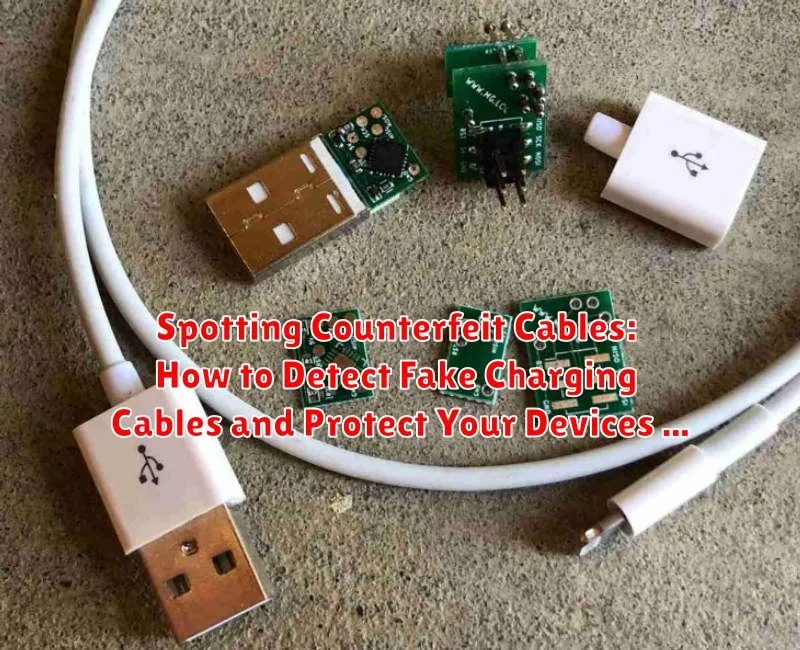
Counterfeit charging cables pose a significant threat to both your electronic devices and personal safety. These deceptively similar fake cables often lack the crucial safety features of genuine, certified charging cables, leading to potential risks such as overheating, fire hazards, and damage to your valuable devices. Learning how to spot these counterfeit cables is paramount for protecting your investments and ensuring your well-being. This article will equip you with the knowledge to identify telltale signs of fake charging cables, allowing you to confidently choose certified, safe options for all your charging needs.
Identifying counterfeit cables can be challenging due to their often-convincing appearance. However, understanding key differences between genuine and fake cables can help you make informed purchases and avoid the risks associated with substandard products. From examining the packaging and labeling to inspecting the cable construction and connector details, this guide will provide you with a comprehensive checklist to effectively spot counterfeit cables and safeguard your electronics and personal safety. Protecting your devices from the dangers of fake cables starts with becoming an informed consumer.
Understanding the Risks of Fake Charging Cables
Using counterfeit charging cables poses significant risks to both your devices and your personal safety. These cheaply made cables often cut corners on essential safety features, leading to a variety of potential problems.
Fire Hazard: One of the most serious risks is fire. Counterfeit cables may use subpar materials and inadequate insulation, increasing the risk of overheating and potentially igniting a fire. This can damage your property and even endanger your life.
Device Damage: Fake cables can deliver unstable or incorrect voltage to your device. This can damage the battery, shorten its lifespan, or even permanently fry the charging circuitry within your device, leading to costly repairs or replacements.
Data Loss: Some counterfeit cables have been known to cause data corruption or loss due to fluctuating power delivery. This can result in the loss of important files, photos, and other valuable data.
Visual Inspection: Spotting the Telltale Signs of a Counterfeit Cable
A careful visual inspection can often reveal a counterfeit cable. Examine the cable’s construction for inconsistencies.
Check the connector’s quality. Counterfeit cables may have poorly molded plastic, misaligned pins, or rough edges. Genuine connectors typically have a smooth, uniform finish. Look for variations in color, material, or markings on the connector compared to a genuine cable.
Inspect the cable itself. Counterfeits may have thinner insulation, different texturing, or inconsistent coloring. The cable’s markings, such as the USB logo or manufacturer’s name, should be clear, crisp, and correctly spelled. Compare the text and logo size and font against an authentic cable. Faded, blurry, or misspelled markings are red flags.
Pay attention to the overall length and weight. Counterfeit cables may be shorter or lighter than genuine cables due to the use of inferior materials. If the cable feels unusually light or flimsy, it could be a sign of a counterfeit.
Performance Issues: Identifying Problems Caused by Fake Cables
Counterfeit cables often exhibit performance issues that can signal their substandard quality. One common problem is slow charging. If your device takes significantly longer to charge than usual, the cable may be the culprit. This is often due to the counterfeit cable’s inability to handle the correct current.
Overheating is another serious issue. A fake cable may become excessively hot during charging, posing a fire hazard. This is often caused by inferior materials and inadequate insulation. If your cable feels unusually warm, immediately discontinue use.
Intermittent charging is also a common sign of a counterfeit cable. Your device may start and stop charging repeatedly, or the connection might be easily disrupted. This can be due to loose internal wiring or poorly constructed connectors within the fake cable.
Finally, some counterfeit cables may even cause damage to your device. This can range from damage to the charging port to more serious issues with the device’s battery or internal circuitry. If you notice any unusual behavior from your device while using a particular cable, stop using it immediately.
Checking Certifications and Manufacturer Information
Genuine charging cables often carry certifications from regulatory bodies. Look for markings such as CE, FCC, or MFi (Made for iPhone/iPad/iPod). Counterfeit cables often lack these certifications or display fake markings. Carefully examine the quality of the printing. Blurry or misaligned logos can indicate a counterfeit.
Check the manufacturer’s information. Legitimate manufacturers typically include details like their name, website, and contact information on the cable packaging or sometimes even on the cable itself. Counterfeit cables often have missing or inaccurate manufacturer information. If the information provided seems suspicious, visit the manufacturer’s official website and verify the product’s authenticity.
Be wary of generic branding. While some legitimate third-party cables exist, counterfeiters often use generic names and descriptions. If the branding seems vague or unfamiliar, proceed with caution.
Compatibility Check: Ensuring the Cable Works with Your Device
A crucial step in verifying cable authenticity is confirming its compatibility with your device. Counterfeit cables may be designed for a general standard but lack the specific features required by your particular device. This can lead to inefficient charging, data transfer issues, or even damage to your device’s charging circuitry.
Check the manufacturer’s specifications: Consult your device’s user manual or the manufacturer’s website for information on the recommended cable type and specifications. Compare these details with the information provided on the cable packaging (if available) or printed on the cable itself. Pay attention to details such as the connector type, data transfer rate, and power delivery capacity.
Test the cable’s functionality: If possible, test the cable with your device before relying on it exclusively. Observe charging speed and efficiency. If the cable charges significantly slower than the original cable or causes overheating, it may be counterfeit. Similarly, test data transfer speeds if the cable is designed for data synchronization. Slow or unreliable data transfer can also indicate a fake cable.
Price Check: If It’s Too Good to Be True, It Probably Is
One of the most obvious signs of a counterfeit cable is a suspiciously low price. Compare prices across multiple reputable retailers to get a sense of the average cost for the specific cable you need. If you find a cable significantly cheaper than the average, be wary. Counterfeiters often lure buyers with deep discounts, exploiting the desire to save money.
Genuine cables are manufactured with quality materials and undergo rigorous testing, contributing to their cost. Counterfeit cables often cut corners using inferior materials and bypassing safety testing to maximize profits. This difference in manufacturing costs is reflected in the retail price. A drastically reduced price is a strong indicator that the cable may not be genuine.
While sales and promotions do occur, extreme price drops should raise a red flag. Consider the potential risks. A cheap cable might save you a few dollars upfront but could end up damaging your device, leading to costly repairs or even data loss. Investing in a genuine cable offers long-term protection for your valuable electronics.
Trusted Retailers: Where to Buy Genuine Charging Cables
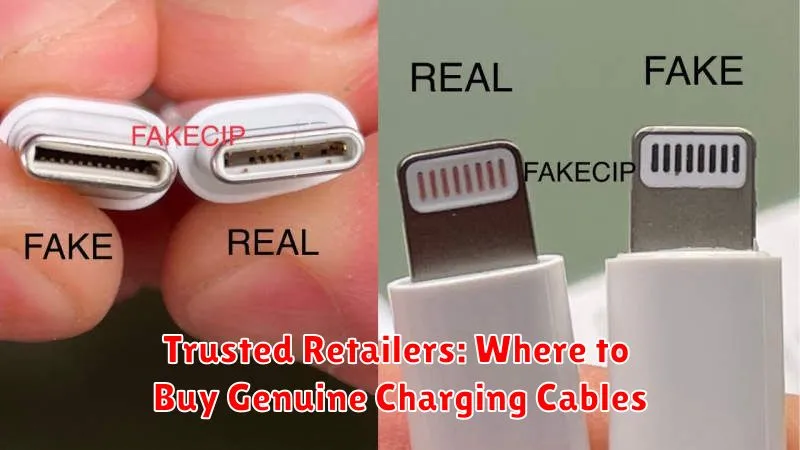
Purchasing charging cables from authorized retailers significantly reduces the risk of encountering counterfeits. Authorized retailers have established relationships with manufacturers and are more likely to sell genuine products. Look for official brand stores, whether online or physical locations.
Reputable online marketplaces can also be a safe option, provided you purchase from verified sellers or the marketplace’s own official store. Check seller ratings and reviews carefully before making a purchase.
Consider buying directly from the manufacturer’s website. This is often the most reliable way to ensure you’re getting a genuine cable, and it can also offer access to warranties and customer support directly from the source.
Specialty electronics stores that focus on quality and authorized products are another viable option. These stores typically have knowledgeable staff who can answer your questions and help you choose the right cable for your device.
Avoid purchasing from unauthorized third-party sellers, particularly on unfamiliar websites or marketplaces. Deep discounts and unbelievably low prices are often a red flag for counterfeit products.
Protecting Yourself: Tips for Avoiding Counterfeit Cables
Protecting your devices from the dangers of counterfeit cables requires proactive measures. Here are some key tips to help you avoid purchasing fakes:
1. Be Wary of Online Marketplaces: While convenient, online marketplaces can be breeding grounds for counterfeit goods. Exercise extra caution when purchasing cables from third-party sellers. Look for established sellers with positive reviews.
2. Check Packaging Carefully: Counterfeit cables often have poorly designed packaging with misspellings, blurry images, or low-quality printing. Compare the packaging to images of genuine products on the manufacturer’s website.
3. Inspect the Cable Itself: Genuine cables typically have a consistent texture, weight, and flexibility. Look for inconsistencies like mismatched colors, flimsy materials, or poorly constructed connectors. Check for proper markings and certifications.
Testing and Verification: Using Tools to Identify Fake Cables
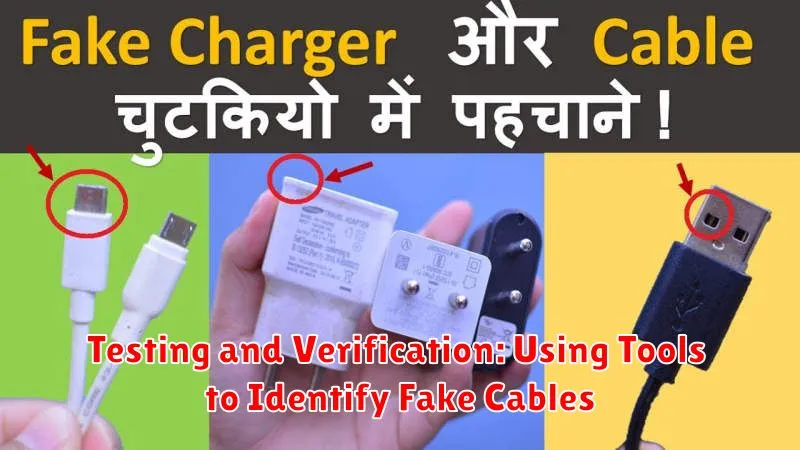
While visual inspection can help, some counterfeit cables are deceptively well-made. Using specialized tools can offer a more definitive assessment.
USB Power Meters: These devices measure the voltage and amperage delivered through the cable. A genuine cable will consistently deliver the expected power output, while a counterfeit may show fluctuations or significantly lower values. This is crucial as insufficient power delivery can harm your device’s battery.
Cable Testers: Specialized cable testers can verify the integrity of the cable’s wiring and shielding. They can identify issues such as broken wires or poor shielding, which are common in counterfeit cables. These testers can provide detailed information about the cable’s construction and performance.
Software Tools (for data cables): For data transfer cables, using software that tests data transfer speeds can be helpful. Counterfeit cables often have inferior wiring, which can result in slower data transfer rates than genuine cables.
