
In today’s hyper-connected world, mobile data is essential for staying connected, informed, and productive. Whether you’re streaming your favorite shows, navigating with GPS, or simply browsing social media, understanding and managing your mobile data usage is crucial to avoid unexpected overages and maintain a smooth online experience. This comprehensive guide offers invaluable strategies for mastering your mobile data. We’ll explore effective methods for checking data usage on various devices and operating systems, empowering you to stay within your data limits.
Managing data usage effectively not only helps control costs but also ensures you have access to the data you need when you need it. From understanding your data plan to implementing practical tips and utilizing built-in device features, this guide provides a complete overview of mobile data management. Learn how to monitor data usage, set usage alerts, and control which apps consume your precious data. Master your mobile data and take control of your digital life.
Understanding Your Data Plan
Before you can effectively manage your mobile data, it’s crucial to understand the details of your data plan. This includes knowing your data allowance, the billing cycle, and any overage charges.
Your data allowance is the amount of data you can use each billing cycle. This is typically measured in gigabytes (GB) or terabytes (TB). Exceeding this allowance can result in overage charges or a reduction in data speeds, often called throttling.
The billing cycle determines when your data usage resets. This is usually a monthly period, but it can vary depending on your provider. Knowing your billing cycle helps you track your usage and avoid surprises.
Overage charges are fees applied when you exceed your data allowance. These charges can be significant, so it’s important to be aware of them. Some plans offer unlimited data, but these may still have restrictions on speed after a certain usage threshold.
Reviewing your plan details with your provider or checking their website is essential. Understanding these key elements will empower you to make informed decisions about your mobile data usage.
Checking Data Usage on Android Devices
Monitoring your data usage on Android is crucial for staying within your plan’s limits. Android offers built-in tools to track your consumption effectively. The exact steps might vary slightly depending on your device’s manufacturer and Android version, but the general process is similar.
Typically, you can find data usage information within your device’s Settings app. Look for a section named “Connections,” “Network & internet,” or something similar. Within this section, you should find an option related to “Data Usage.”
This section usually provides a visual representation of your data usage over a specific period, often aligned with your billing cycle. You’ll see the total amount of data used, and sometimes a breakdown by app. Pay close attention to the data usage cycle displayed to ensure it matches your plan’s billing period for accurate tracking. You can typically customize the cycle dates if needed.
Some Android versions offer the capability to set data warnings and limits directly within this menu. This allows you to receive notifications when you approach your data limit, preventing unexpected overage charges.
Checking Data Usage on iOS Devices
Staying informed about your data consumption on an iOS device is straightforward. Apple provides built-in tools to monitor your cellular data usage directly within your device’s settings.
To access this information, open the Settings app. Then, tap on Cellular. Here, you’ll find a detailed breakdown of your cellular data usage.
The Current Period section displays your data usage for the current billing cycle. This section allows you to monitor how much data you’ve used since your last billing cycle reset. Pay close attention to this section to avoid exceeding your data limit.
Further down, you’ll find a list of apps with their individual data usage. This allows you to identify which apps consume the most data. You can manage data usage per app by toggling Cellular Data on or off for specific apps within this list. This gives you granular control over your data consumption.
Monitoring Data Usage with Third-Party Apps
While built-in data monitoring tools are helpful, third-party apps often offer more advanced features and granular control over data tracking.
These apps can provide real-time data usage updates, customizable alerts, and detailed breakdowns of data consumption by individual apps.
Many third-party apps offer predictive analysis, estimating future data usage based on current trends. This helps users anticipate potential overages and adjust their habits accordingly.
Some apps also offer features like data compression and ad blocking to help minimize data consumption. Choosing the right app depends on individual needs and preferences.
Setting Data Usage Limits and Alerts
Proactively managing your data consumption can prevent overcharges and ensure you stay within your plan’s limits. Both Android and iOS devices offer built-in tools to set data usage limits and configure alerts to notify you when you approach your threshold.
Setting Data Limits: You can typically establish a monthly data limit that aligns with your plan’s allowance. Once this limit is reached, your device can be configured to automatically disable mobile data, preventing further usage.
Configuring Data Alerts: Set usage alerts to warn you as you approach your data limit. This allows you to adjust your usage habits before exceeding your allowance. You can often customize the alert thresholds, for example, receiving a warning at 75% and 90% of your monthly limit.
Additional Controls: Some devices and carriers offer additional controls, such as the ability to restrict background data usage for specific apps or entirely. This helps conserve data by preventing apps from using data when you’re not actively using them.
Tips for Reducing Data Consumption
Managing your mobile data efficiently is crucial to avoid overcharges and maintain consistent connectivity. Here are several practical tips to minimize your data consumption:
Wi-Fi Prioritization
Whenever possible, connect to available Wi-Fi networks. Prioritize Wi-Fi usage at home, work, or public hotspots to offload data usage from your mobile network.
Restrict Background Data
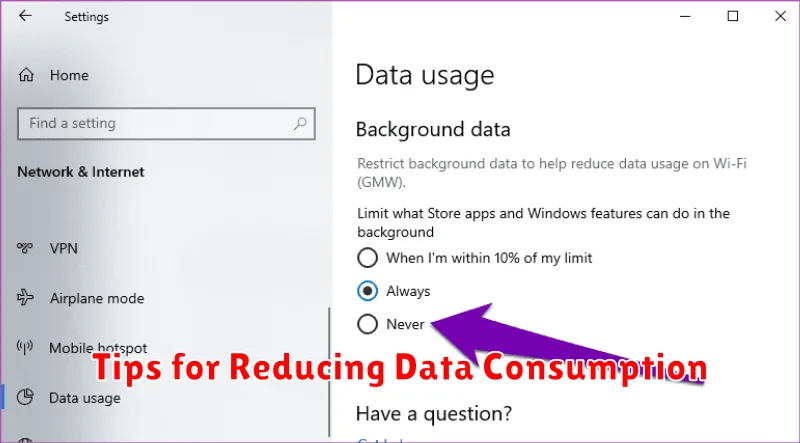
Many apps consume data in the background even when you’re not actively using them. Limit background data usage within your device’s settings to conserve data. You can choose to restrict background data for specific apps or entirely.
Data Compression in Browsers
Some mobile browsers offer data compression features. Enabling this setting can significantly reduce data usage while browsing the web. Check your browser’s settings for this option.
Monitor and Manage App Usage
Regularly monitor your data usage per app. Your device’s settings will typically display data consumption details for each app. Identify apps using excessive data and adjust their usage accordingly.
Troubleshooting High Data Usage
Unexpectedly high data usage can be frustrating. This section provides troubleshooting steps to help identify and resolve the issue.
Check Data Usage Settings
Begin by reviewing your phone’s data usage settings. Verify the data usage cycle aligns with your billing period to ensure an accurate comparison. Some devices offer built-in tools to track data usage by app. This can pinpoint data-hungry applications.
Background Data Usage
Many apps consume data in the background even when not actively in use. Restrict background data for non-essential apps to conserve data. You can typically find these settings within the app management section of your device.
Software Updates
Ensure your device’s operating system and apps are up-to-date. Updates often include optimizations that improve data efficiency.
Streaming Quality
If you stream video or music frequently, consider lowering the streaming quality within the app’s settings. This can significantly reduce data consumption.
Understanding Data Roaming and International Usage
Data roaming allows you to use your mobile data connection when traveling outside your home network’s coverage area. It’s a convenient way to stay connected, but it can be significantly more expensive than using your regular data plan.
When roaming, you utilize a partner network’s infrastructure, and your home network provider is billed for this usage. This cost is then passed on to you, often at a premium rate. Before traveling internationally, it’s crucial to understand your carrier’s roaming charges to avoid unexpected bills.
Many carriers offer international roaming packages that provide a set amount of data or minutes for a fixed fee. These packages are typically more cost-effective than pay-as-you-go roaming, so research and activate a suitable plan before your trip.
To avoid high roaming costs, consider alternatives like using Wi-Fi whenever possible, purchasing a local SIM card, or disabling data roaming altogether and relying on communication apps that function over Wi-Fi.
